
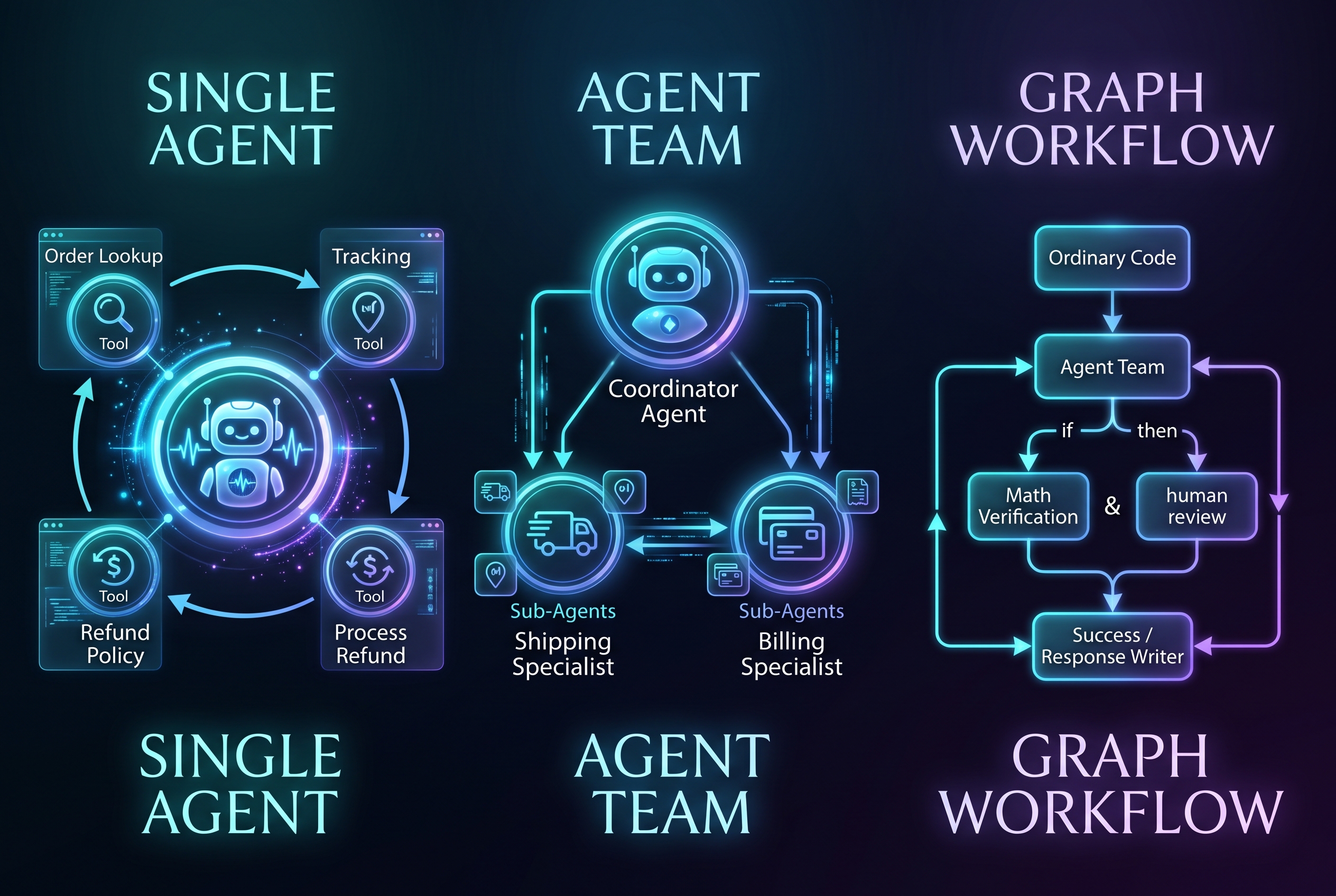
Designing a modern AI application involves choosing the right architectural pattern to handle tasks efficiently and reliably. In a recent video from Google Cloud Tech, three primary ways of building modern AI applications were explored: a single agent, an agent team, and a graph workflow.
By looking at a common customer service scenario—handling a customer message that says, “My order never arrived, can I get a refund?”—we can see how each of these design patterns functions, when to use them, and how they can be combined.
1. The Single Agent
In a single agent setup, one AI agent is responsible for helping the customer from the beginning of the request to the very end.
At the center of this design is an underlying language model. The model interprets the customer’s message and decides what to do next based on the instructions it has been given. To do its job, the agent is equipped with specific tools, such as functions to look up orders, check shipment tracking, retrieve refund policies, and process refunds.
How it works: The application runs the agent in a continuous loop.
- The model requests a tool call (e.g., lookup order).
- The application runs that tool and sends the result back to the model.
- The model uses that result to choose its next action (e.g., check delivery status).
If the carrier confirms the package was lost, the agent knows to check the refund policy. If the order qualifies, the agent requests the refund and explains the outcome to the customer.
When to use it: A single agent is highly adaptable. If it can’t find an order, it can automatically ask the customer for more information. This flexibility makes it a great starting point. It provides a focused set of tools and a single place to manage instructions for relatively straightforward, self-contained tasks.
2. The Agent Team
As an application grows, a single agent might become overwhelmed. A customer support app might eventually need to handle delivery problems, billing disputes, returns, and subscription changes. Giving one agent all those tools, policies, and responsibilities can lead to poor performance and messy instructions. This is where an agent team comes in.
An agent team divides responsibilities across specialized sub-agents. A common setup uses a “parent” or “coordinator” agent that receives the customer’s initial request and delegates the work.
How it works: In our scenario, the coordinator agent might delegate tasks to a Shipping Specialist and a Billing Specialist.
- The Shipping Specialist is given only the tools for investigating shipments and delivery updates.
- The Billing Specialist is given only the tools for reviewing payments, refund history, and policies.
- Each specialist operates with its own specific instructions and working context.
The coordinator asks the shipping agent to investigate. The shipping agent reports the package as lost. The coordinator then passes that finding to the billing agent, who checks payment eligibility. Finally, the coordinator uses both results to resolve the request.
When to use it: Use a team when responsibilities are substantial enough that they are worth separating. It allows developers to update the shipping specialist’s behavior without cluttering the coordinator’s instructions. However, the trade-off is coordination—agents must exchange the right information accurately, and adding more agents can increase cost and latency.
3. The Graph Workflow
While agents provide flexibility, businesses often require strict processes. For example, before money moves for a refund, certain exact checks must happen, and a customer should only receive a refund confirmation after the payment service reports success. We can enforce these explicit requirements using a graph workflow.
A graph workflow is essentially an executable flowchart that defines the steps of an application and exactly how they connect.
How it works: In a graph workflow:
- Nodes represent steps. A node can be an ordinary code function, a simple model call, an individual agent, or an entire agent team.
- Edges represent the connections, defining what runs next, what can happen in parallel, and when a process should branch or loop.
For our support app, the workflow might look like this:
- Ordinary Code Node: Loads order and payment records and verifies the customer’s identity (no AI model needed here).
- Agent Team Node: The shipping and billing specialists investigate the request and propose a resolution (a refund).
- Code Node (Verification): The workflow runs required mathematical checks in code—checking for duplicate requests and calculating the exact refund amount directly from payment records, rather than relying on an AI model to do math.
- Branching Node: If checks pass, it calls the refund function. If an exception is needed, it routes to a human. If info is missing, it loops back to the customer.
- Model Node: A single model call takes the confirmed successful refund data and writes a clear, customer-facing response.
When to use it: Use a graph workflow when your application has required steps, strict business rules, and specific dependencies. If you make a critical business check a “tool” for an agent, you have to rely on the model to actively choose to use it, which costs tokens and isn’t 100% reliable. Making it a node in a workflow guarantees the structure and order of operations.
Bringing It All Together
These three designs are not mutually exclusive; they work best when combined.
In a robust architecture, a graph workflow manages the overall process to ensure reliability and structure. Within that workflow, an agent team handles the investigation phase to divide responsibilities. And within that team, each specialist operates as a single agent loop to flexibly achieve its specific goal.
By letting agents handle investigation and interpretation, and using ordinary code to enforce strict rules and calculations, you can build AI applications that are both highly capable and incredibly reliable.
Leave a Reply