
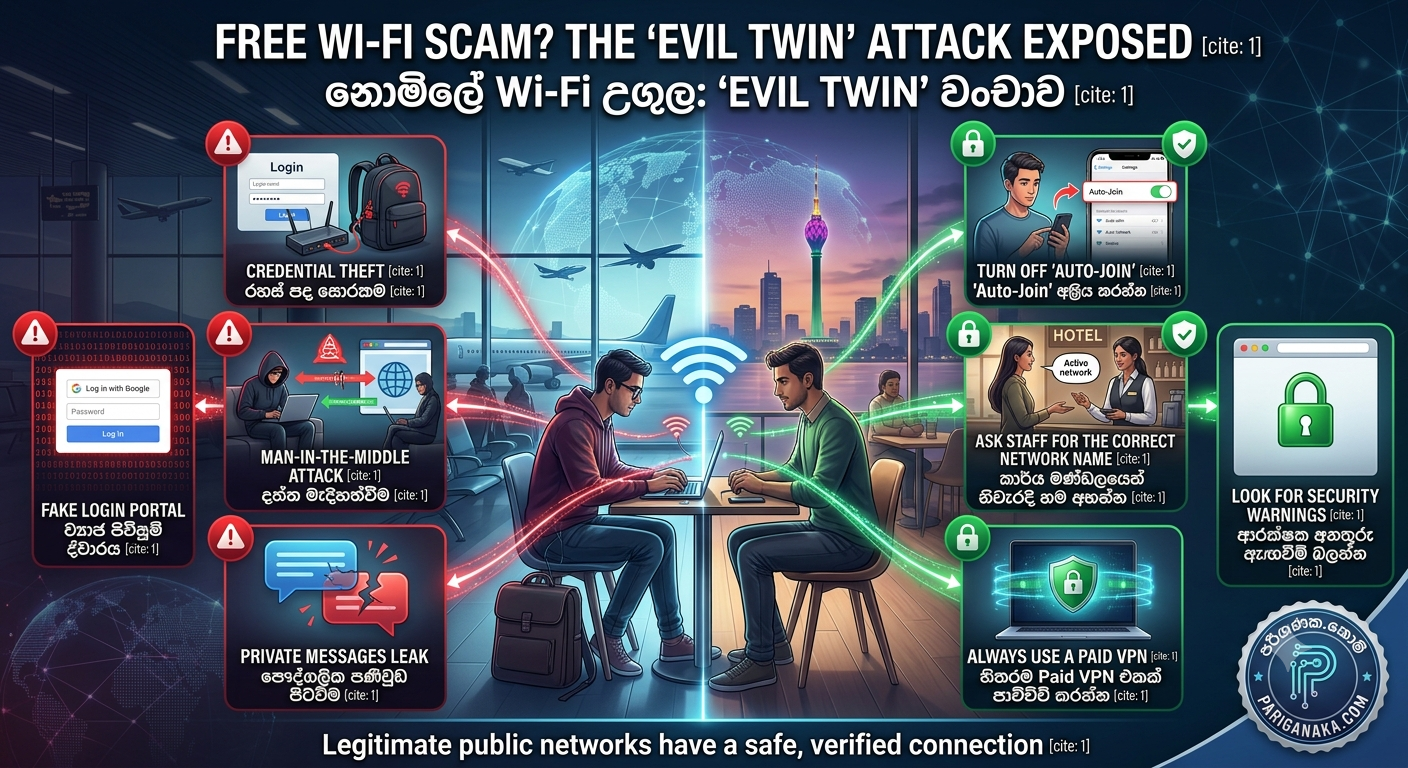
We all love free internet. Whether you are waiting for a flight at the airport, studying at a local coffee shop, or staying at a hotel, connecting to the complimentary Wi-Fi is usually the first thing we do.
But in 2026, cybercriminals are exploiting this exact habit using a terrifyingly simple trick known as the “Evil Twin” Wi-Fi Attack. It requires very little technical skill from the hacker, but it can cost you your passwords, bank details, and private messages.
Here at Pariganaka.com, we want to ensure you never fall into this invisible trap. Here is how the Evil Twin scam works and how to protect your digital life while on the go.
1. What is an “Evil Twin” Network?
An Evil Twin is a fake Wi-Fi hotspot set up by a hacker to look exactly like a legitimate public network.
- The Setup: A hacker sits in a corner of a cafe or airport terminal with a small, hidden router in their backpack.
- The Illusion: They name their router something highly believable. If you are at a cafe named “City Coffee,” the hacker will broadcast a network called
"City Coffee_FREE"or"City Coffee_Guest". - The Goal: Because the hacker’s router is physically closer to you, your phone or laptop will often show it having a stronger signal than the real cafe router, tricking you into clicking it.
2. How the Trap Springs
Once you click on the hacker’s fake network, the real danger begins.
- The Fake Portal: Often, an official-looking login page will pop up, asking you to “Log in with Google” or “Enter your email password” to access the free internet. If you type it in, you just handed your credentials directly to the hacker.
- The Man-in-the-Middle Attack: Even if there is no login page, the hacker is now sitting squarely between your device and the internet. Every unencrypted website you visit, every message you send, and every file you download is routed through their computer, allowing them to intercept your private data in real-time.
3. Red Flags of a Fake Network
Hackers are clever, but they are not invisible. Look out for these warning signs:
- Two Identical Names: If you check your Wi-Fi list and see two networks with almost the exact same name (e.g., “Airport_Wi-Fi” and “Airport Wi-Fi Free”), one of them is likely an Evil Twin.
- Browser Security Warnings: If you connect and your browser suddenly throws a red screen saying “Your connection is not private” or “Invalid Certificate,” disconnect immediately. The hacker is trying to bypass website encryption.
- Unusually Slow Speeds: Because the hacker’s small router has to process all your traffic before sending it to the real internet, the connection will often feel incredibly slow or laggy.
4. Smart Ways to Protect Yourself
You do not have to avoid the internet when you are out of the house, but you must take control of your connection.
- Turn Off “Auto-Join”: Go to your phone’s Wi-Fi settings and disable “Auto-Join” or “Auto-Connect” for public networks. Your phone should never connect to an open network without your explicit permission.
- Ask the Staff: Before connecting at a hotel or restaurant, physically ask the staff for the exact name of their network and the password. Evil Twins are usually open networks without a password requirement.
- Use a Paid VPN: If you absolutely must use public Wi-Fi, turn on a premium VPN (like ProtonVPN, NordVPN, or ExpressVPN) before you open your browser or banking app. A VPN scrambles all your data into an unreadable code, making it useless to the hacker even if they intercept it.
Quick Guide to Public Wi-Fi
| Situation | Do This ✅ | Don’t Do This ❌ |
| Connecting | Verify the exact network name with staff | Click the network with the strongest signal blindly |
| Browsing | Use a trusted VPN at all times | Check bank accounts or make online purchases |
| Phone Settings | Turn off Wi-Fi when leaving the building | Leave “Auto-Join” enabled for open networks |
The Bottom Line:
When it comes to public Wi-Fi, convenience is the enemy of security. Treat every open, password-free network as potentially hostile. By taking a few extra seconds to verify your connection and using a VPN, you can keep your data firmly out of the hands of cybercriminals.
Stay safe, and keep checking Pariganaka.com for the latest tips to protect your digital life!
Leave a Reply